Restaurant
Simply at the table.
The menu at hand.
On a table, at the counter or in a window: give access to the right menu through an address you can keep over time.
Fictional example
The menu, right here.
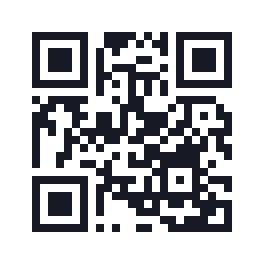
https://example.org/menuYour turn
A well-prepared project.
Choose a lasting address
Use a page you control, such as your website's menu page. You can change the dishes without changing the QR code as long as the address stays the same. Qurl encodes the link; it does not host your menu.
Create a QR code for my menuSeparate menu and Wi-Fi
One QR code for the menu, another for the guest network: label each purpose on its display. The Wi-Fi QR code contains network access details; use credentials intended for your customers.
Prepare the Wi-Fi QR codeTest your table display
Keep the whole QR code and its light quiet zone. Download an actual-size PDF, then test scanning under the room's lighting and with the planned finish. A glossy surface or curved display can make scanning harder.
Prepare my print
The final details
Before the first service.
A QR code decoded on screen is a first check. Also verify the destination and the material actually used.
- Open the menu on a phone without signing into its administrator account: it must be accessible to your customers.
- Check that the menu text is comfortable to read on mobile. Avoid a tiny photo of the printed menu.
- Add a readable address and a label such as “View the menu”. Keep an alternative for people who cannot scan.
- Test the printed file, then regularly check that the address and menu remain available.
Good to know
Before getting started.
Can I change my menu after printing?
Yes, if you update the page or file at the same address. The static QR code keeps its link. If the address changes, create a new QR code and replace the display.
Can I use a PDF already online?
Yes, using its full public address. Check access while signed out, file size and readability on a phone. A mobile-friendly web page may be more practical for a long menu.
Does the QR code tell me how many scans it gets?
Qurl does not track scans of these static QR codes. The code points straight to your address, without a Qurl tracking redirect.
Sources
See our checks and their limits.