A grid containing data
The small squares in a QR are called modules. Their arrangement encodes information in two dimensions. Some modules contribute to the content; others provide positioning or error correction. The pattern is therefore neither random nor a miniature picture of the page to open.
A QR containing a URL stores that address, rather than the site’s text and photos. A vCard contains contact fields; a Wi-Fi QR may contain network settings. The application reading those data then determines the presentation or action it can offer.
To create your first example, the QR code generator lets you enter a link or text. The principle is the same: data become a pattern that the reader must be able to reconstruct.

What are the three large squares for?
On a conventional QR, the three large corner squares are position detection patterns. They help the reader locate the symbol and determine its orientation. That is why a QR does not necessarily need to be upright to be recognised.
Alternating light and dark modules help establish grid positions. Depending on the version, smaller alignment patterns also help correct image geometry. Their role is separate from the data to recover.
The clear area around the symbol matters too. For the conventional QR described here, preserve a free margin of four modules on every side. Avoid putting text against it or cropping it away. These patterns describe the common QR; variants such as Micro QR have a different structure.
From framing the image to readable content
- The reader receives an image, captured by a camera or imported from a file.
- It searches for patterns to locate the QR and estimate its orientation.
- It establishes grid positions and evaluates light and dark modules.
- It interprets format information, reconstructs data and uses error correction within its limits.
- It presents the result; an application may then offer an action suited to the content.
Format information includes the correction level and mask applied to the pattern. Masking helps organise a pattern that the reader can process; it is not encryption that makes the content secret.
A decoded result does not authenticate whoever placed the QR. Before following a link, examine its destination and the material’s context. The guide to checking where a QR code leads explains that check.
Two QR codes to read: an address and text
Save one of these fictional PNGs, then select it in the QR reader. Compare the result with the content shown below the image. The address is for this reading exercise, rather than a real workshop to visit.
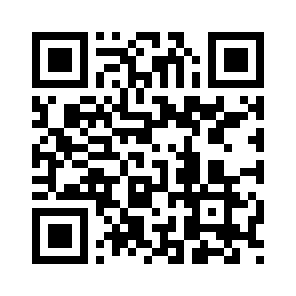
https://example.org/atelier
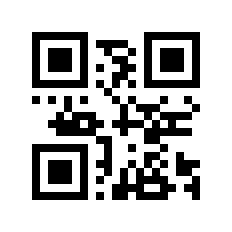
ATELIER-042
The first example contains a URL: an application may offer to open it. The second contains only a reference to read or copy. Both are QR codes, even though only one contains a web address.
In these files, the address grid has 29 × 29 modules and the text grid has 21 × 21, excluding margins. Their PNGs measure 296 × 296 and 232 × 232 pixels respectively. A module is a grid element; here it occupies several pixels. Enlarging the file does not change the number of encoded modules.
What error correction can recover
A QR contains redundant information that may allow data recovery despite some damage. Correction helps when some elements are misread; it does not remove the need for a sharp, contrasting and complete symbol.
The correction level does not represent an area you can freely cover. The result depends on what is damaged and whether the code can be located. A logo placed over a positioning pattern can prevent reading before content reconstruction even begins.
Correction also cannot fix an incorrect URL, mistyped password or deleted page. A QR can decode perfectly and lead to an error. For personalisation, see adding a logo without losing readability ; for a failure, start with unreadable QR diagnostic.
Why do some QR codes have more small squares?
Conventional QR versions run from 1 to 40: the grid grows from 21 × 21 to 177 × 177 modules, adding four modules per side with each version. The required version depends on content, encoding mode and correction level.
A long address or detailed contact information can therefore produce a denser pattern than short text. At the same printed width, more modules mean smaller elements. The guide to understanding QR code density explores that choice.
Once created, a QR retains the data in its pattern. If those data are an address, the page’s content can change at that same address. The static and dynamic QR codes explains what differs with the type of link used.
What this means for your material
- Preserve the complete symbol and margin: the corners are functional.
- Choose a size that leaves modules sufficiently distinct on the material.
- Keep a dark pattern on a light background with clear contrast.
- State the intended action beside the QR and provide a readable address or another useful route.
- Compare decoded data with your source, then separately check the destination and offered access.
The guide to printing a QR code at the right size and the practical resources help prepare the material. On packaging, the pattern alone does not guarantee checkout support: the news article on retail QR codes and GS1 distinguishes web access from standardised commercial uses.
Successfully reading a file confirms the data recovered from that image. It does not replace testing your print, placement or final journey.
Frequently asked questions about how QR codes work
Do you need the Internet to read a QR code?
Image decoding and access to online content are separate. A reader can recover the text in a QR without visiting the named site. Opening an online page then requires the necessary access conditions.
Why are there only three large positioning patterns?
Their arrangement helps the reader recognise a conventional QR and its orientation. The fourth corner does not need an identical large pattern; other grid elements contribute to reading.
Does scanning a QR always open a website?
No. A QR may contain text or data for another action. Even for a URL, opening depends on the reader and the choice offered to the user.
Does a correctly decoded QR necessarily contain correct information?
No. A reader can recover a mistyped address exactly. Compare the content with your reference, then check what the destination actually offers.