Check what is actually encoded
Start with a test address containing no confidential information. Download the QR code, then read its content without automatically opening the destination. Compare the exact text with the address you entered.
If another domain appears, find out what the intermediary does and its conditions for continued operation. An intermediary link can be useful, but adds a dependency. A direct URL still depends on its domain and content. The static or dynamic guide explains the difference.
Review five points
- Destination. Does the decoded text match the expected content? Has a domain or any parameters been added?
- Terms. Do the current offer terms include a trial, deadline, account or payment to keep a redirect active? Keep useful information before sharing long-lasting materials.
- File. Can you actually download the required format? Check dimensions, quiet zone and any watermark, beyond the displayed preview.
- Independence. Can you keep your file and understand its dependencies without returning to a dashboard? Who controls the encoded domain?
- Final test. Can the QR code be scanned after insertion and printing at the intended size? Is the destination accessible with your readers' permissions?
This checklist helps assess an offer when choosing it. It does not rank providers or guarantee their future terms. Formats and readability deserve checking even when a file is free and has no watermark.
A repeatable test with Qurl
Use the fictional address https://example.org/menu. It is for comparing data, not viewing a real menu. The figure below is generated with Qurl's engine and decoded during the site build.
- Open the Qurl generator and enter this address in “Website address”.
- View the exact encoded content and compare it with your input.
- Download the PNG. It should be available without sign-up, a payment card or a Qurl watermark.
- Open this PNG in the local reader. The expected text is exactly
https://example.org/menu. - Keep the file, then repeat the check with your real content before preparing the final materials.
You can also start with the library's fictional PNG. The reader accepts PNG, JPEG and WebP images; it does not directly import SVG or PDF.
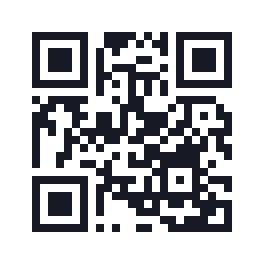
View this example's data
https://example.org/menu
25 modules · 19.8 mm with 0.6 mm modules and the quiet zone included.
Separate the file from the service behind it
Qurl generates files in your browser and creates no Qurl redirect for your static QR codes. The downloaded pattern has no expiry date imposed by Qurl. This does not guarantee the availability of the website, PDF or service opened after scanning.
For lasting materials, keep an address you can maintain. Record who renews the domain and who can replace the content. If there is an intermediary service, also check access and terms. The guide to QR code lifespan distinguishes these causes of interruption; the guide to corrections after printing explains what can still be changed.
Check the file placed in your materials
A sharp preview is not enough: examine the actual downloaded file, then its appearance in the layout. The light quiet zone is part of the QR code. Keep it intact, preserve the square without distortion and add a readable indication of the destination.
The choice of PNG, SVG or PDF depends on your software and material. Test at final size, using the relevant devices and lighting, before a print run. Successful software decoding validates that file under test conditions; it does not certify all prints or phones.